
Ninja AB
Reference like a pro, section by section
Do you want to make great sounding tracks?
Get the perspective of a pro on each mixing decision you make. Know what the level of your vocal needs to be, how much bass to dial in and if your master is loud enough. A/B referencing, the way it should have always been.
Section Tagging & Sync
Make it simple to hear differences, by comparing a drop to a drop and a chorus to a chorus. Tagging refs is easy and you do it once. Then take it anywhere. No more re-setting cue points per preset.
Visual Overviews
Waveform, RMS, PSR (compression) and multiband views. Get a new perspective on what a finished track looks like, so you can see exactly how to make your track hit like your favs.
Live Capture
Your project audio is captured and displayed in great detail. You can scroll and zoom through the whole timeline, just like all the references. No more lost history in scrolling windows.
Level Match & Auditioning
Your reference's gain is auto-matched, and so are all the visuals. So what you see and what you hear is consistent. Stereo and sweepable band monitoring is a click away.
Referencing gives you superpowers
Why reference?
We all know that there are really no silver bullets, hacks or shortcuts when it comes to making a great piece of music. But if there's one consistent tip, a best practice, a great way to learn and improve your tracks and mixes, it is referencing. Just doing a last-minute check on your mix with a reference track you know sounds good can instantly give you the insight to make a change that improves your mix by a lot.
Ninja AB makes that process super easy and fun. Referencing section by section gives you that extra edge so the right direction becomes clear. And you'll be able to make decisions that improve the whole song, from start to finish.
How it works

Capture
Insert Ninja AB on your master and press play. Your project builds the same loudness and dynamics overview as a finished reference, so you can scroll back through the whole song at any time.
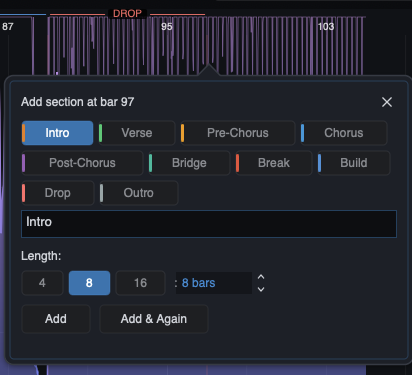
Tag
Tag the sections of your references and your project once. Ninja AB saves the metadata with the track, so your tags are ready the next time you load it.

Compare
Turn on Sync and move through your song. The reference follows section by section, level-matched and ready for a fair comparison.
Ninja AB Explained
Features
Pricing
Ninja AB: Full License
including taxes
- One time fee
- Free updates for all v1.x versions
- 14 day full money back return policy
- macOS (Intel / Apple Silicon), Windows 64-bit and Linux
- VST3, AU, AAX, CLAP
Hear the difference?
Try it for free
Fill in your email below and receive a free 14 day trial license right in your inbox.
You're almost there! Check your inbox and confirm your address to get your trial license.
The Creator
Crafted by
The Him
Developed by EDM DJ/Producer, The Him, with half a billion Spotify streams. Remixer for Tiësto, The Chainsmokers, Martin Garrix, Miley Cyrus, and more. A world-class producer’s tool for your studio.

